Is this Apple Pay fraud alert text real?
Apple Pay Alert: A transaction of $1,157.43 at Apple Store Online has been flagged on your account. If you did not authorize this purchase, call Apple Support immediately at (866) 540-3159 to secure your account. Failure to respond within 24 hours will result in the charge being processed. Ref #AP-8834721
It is a scam. Hang up. Apple states on its support page: "Apple will never ask you to provide your password or verification codes." That one sentence settles it. Real Apple Pay fraud alerts show up inside the Wallet app or as a push notification you tap to open your own account. They never hand you a phone number. Apple already knows who you are because the alert is tied to your device.
How to spot the Apple scam
- The message includes a phone number.Why
- The dollar amount is chosen to match a real Apple product. $1,157 sits close to the price of a MacBook Air.Why
- The person who answers asks for the six-digit code that just appeared on your screen.Why
- The code on your screen is real, sent by Apple's servers.Why
- With your Apple ID session, every linked card is exposed.Why
- "Failure to respond within 24 hours" is a fabricated rule.Why
- The text arrives from an unrecognizable sender. iMessage scam texts can spoof a short code or display name that looks official.Why
- "Ref #AP-8834721" is a prop.Why
What to do now
- Do not call the number.Why
- If you already called and read out a verification code, go to account.apple.com on a trusted device and change your Apple ID password.Why
- Check every card linked to Apple Pay.Why
- Remove unknown devices from your Apple ID.Why
- Forward the scam text to reportphishing@apple.com.Why
- File a report at ReportFraud.ftc.gov.Why
- Expect a second call.Why
What it looks like on your phone
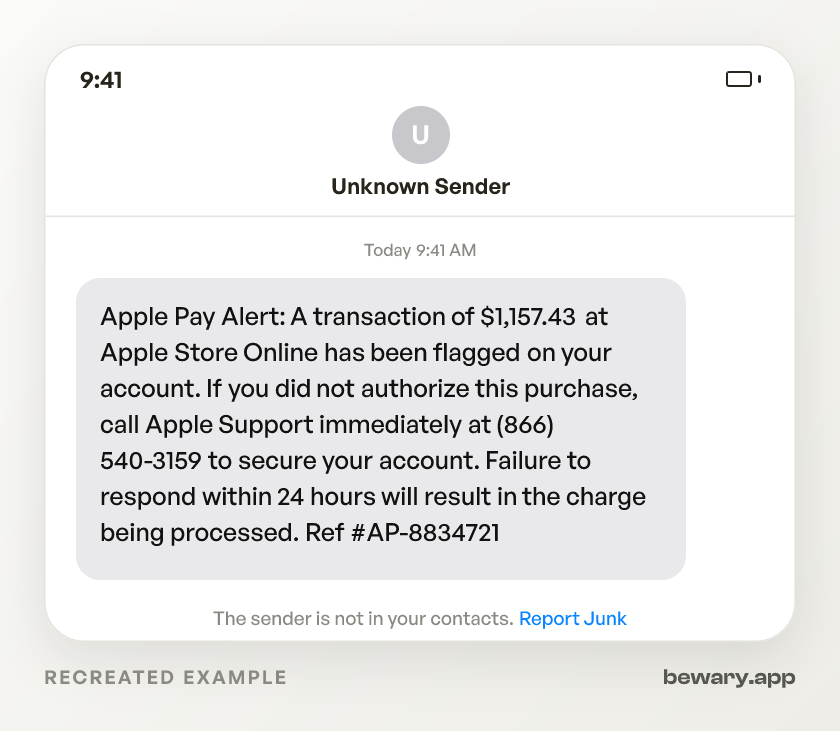
Got a message like this? Check yours free
Paste any text, link, or number you are unsure about. Bewary gives you a straight answer in seconds, and the exact reason why.
Private. Never sold, never tied to you.
The detail behind this
The reasoning behind each line above, for when the immediate question is settled.
Why each of those gives it away
The message includes a phone number.
Real Apple Pay fraud alerts arrive as push notifications or inside the Wallet app. Apple's fraud system ties your identity to the device itself, so it has no reason to make you call in and prove who you are. Any text that gives you a number to dial is working outside Apple's actual alert infrastructure.
The dollar amount is chosen to match a real Apple product. $1,157 sits close to the price of a MacBook Air.
Scammers pick amounts that feel plausible for the Apple Store so you believe someone just bought hardware on your dime. A genuine hold from Apple Pay would appear in your Wallet app transaction list, never in an SMS from an outside number.
The person who answers asks for the six-digit code that just appeared on your screen.
That code is not a "verification" step. It is the second factor of a login. Apple's support page says it plainly: "Apple will never ask you to provide your password or verification codes." The person on the line triggered that code by typing your Apple ID email into Apple's own sign-in page. Reading it aloud completes their login.
The code on your screen is real, sent by Apple's servers.
That is what makes the scam work. The attacker entered your email at appleid.apple.com, Apple generated a legitimate two-factor prompt, and your phone displayed it. The code is genuine. The request to read it out loud is not. Handing it over gives the attacker a fully authenticated session on your Apple ID.
With your Apple ID session, every linked card is exposed.
Apple Pay stores debit cards, credit cards, and bank accounts. An attacker with an active session can add a new device to your account, authorize Apple Cash transfers, and change your recovery email and phone number. The window between their login and your lockout is when the damage happens.
"Failure to respond within 24 hours" is a fabricated rule.
Apple's real fraud process puts a temporary hold on the charge and lets you review it through the Wallet app at your own pace. You can also call the number printed on your physical Apple Card. There is no countdown. Apple does not process disputed charges on a timer.
The text arrives from an unrecognizable sender. iMessage scam texts can spoof a short code or display name that looks official.
Apple's legitimate service messages are delivered through channels tied to your Apple ID and appear alongside your existing Apple notifications. If the same alert does not appear in your Wallet app, Apple did not send it.
"Ref #AP-8834721" is a prop.
Apple's real transaction records use order numbers visible in your purchase history at account.apple.com. You can look up any genuine order there. A reference number in an SMS that does not match anything in your account is decoration, not documentation.
Working through the steps
Do not call the number.
Open the Wallet app and check your Apple Pay transaction history. If no flagged charge appears there, the text is fake. One check, done.
If you already called and read out a verification code, go to account.apple.com on a trusted device and change your Apple ID password.
This ends any session the attacker opened with the stolen code. Re-enable two-factor authentication if the system prompts you.
Check every card linked to Apple Pay.
Open Wallet, tap each card, review recent transactions. If you find charges you did not make, call the issuing bank at the number on the back of your physical card. Dispute the charges and request a replacement card number.
Remove unknown devices from your Apple ID.
Go to Settings > [your name] and scroll to the device list. Anything you do not recognize, remove it. This ends active sessions on hardware the attacker may have added.
Forward the scam text to reportphishing@apple.com.
Apple uses these reports to act against the sending numbers. On iPhone, you can also tap Report Junk beneath the message if the option appears.
File a report at ReportFraud.ftc.gov.
Select "phone scam" and include the callback number from the text. The FTC shares these numbers with telecom carriers who can block them and with law enforcement tracking the call centers behind the operation.
Expect a second call.
Callback scam operations keep lists of people who picked up. A follow-up may come from a different number, claiming to be Apple's "fraud resolution team" or "account security." Same playbook: they ask for a code or remote access. Same answer: hang up.
Sources and reporting
Use official channels to confirm a suspicious request and report fraud.