Is this Apple Pay charge text for $8,250 real?
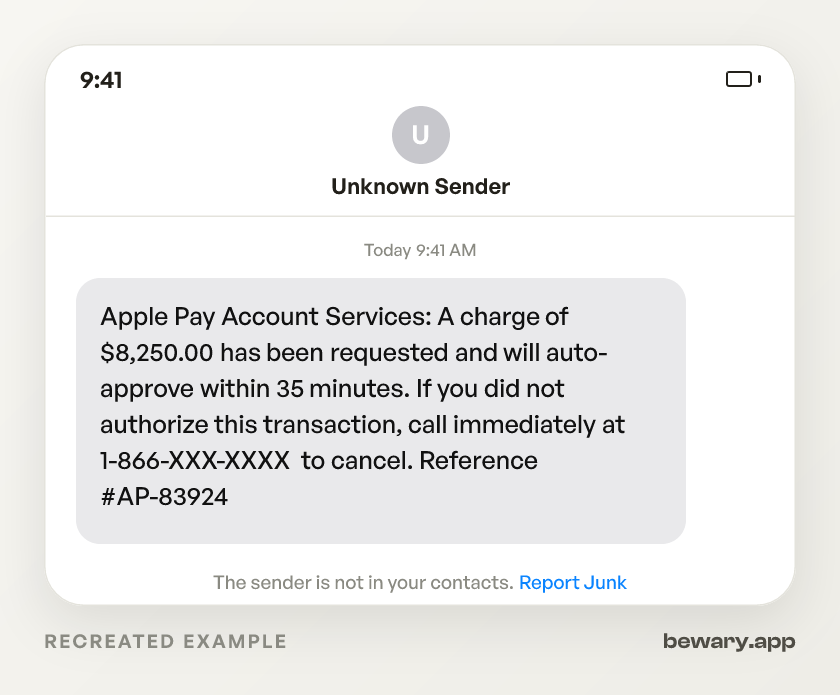
Apple Pay Account Services: A charge of $8,250.00 has been requested and will auto-approve within 35 minutes. If you did not authorize this transaction, call immediately at 1-866-XXX-XXXX to cancel. Reference #AP-83924
Scam. Every Apple Pay transaction requires your Face ID, Touch ID, or passcode at the exact moment of purchase. Nothing sits in a queue and 'auto-approves' after 35 minutes. That process does not exist in Apple Pay, in any card network, or anywhere in payments. The text exists to get you on the phone with a scammer before you open your Wallet app and see zero pending charges.
How to spot the Apple scam
- Apple Pay has no pending-charge queue.Why
- This is a callback scam, not a phishing link.Why
- The sender calls itself 'Apple Pay Account Services.'Why
- The text gives you a number to call but no way to verify the charge on your own device first.Why
- The reference number 'AP-83924' mimics an internal case ID.Why
- The dollar amount is high enough to trigger fear but round enough to seem like an electronics purchase.Why
- If you call, the operator will eventually ask for a six-digit code sent to your phone.Why
- Some operators escalate the call by asking you to install AnyDesk or TeamViewer so they can 'walk you through' canceling the charge.Why
What to do now
- Open your Wallet app.Why
- Already called and read back a six-digit code?Why
- Gave out a card number on the call?Why
- Installed AnyDesk or TeamViewer at the caller's direction?Why
- Forward the scam text to reportphishing@apple.com so Apple can flag the spoofed sender.Why
- File at ReportFraud.ftc.gov and include the phone number from the text.Why
What it looks like on your phone
Got a message like this? Check yours free
Paste any text, link, or number you are unsure about. Bewary gives you a straight answer in seconds, and the exact reason why.
Private. Never sold, never tied to you.
The detail behind this
The reasoning behind each line above, for when the immediate question is settled.
Why each of those gives it away
Apple Pay has no pending-charge queue.
Every purchase requires biometric or passcode confirmation on your device at the point of sale, in real time. A charge that 'auto-approves within 35 minutes' describes a system that does not exist anywhere in Apple's payment stack. The countdown is manufactured panic to stop you from checking your actual transaction history first.
This is a callback scam, not a phishing link.
The text contains no URL. The entire attack is the phone number. When you dial it, you reach a person pretending to be Apple support who will harvest your credentials. Real Apple Pay fraud alerts arrive as push notifications inside the Wallet app or from your card-issuing bank, never as an SMS with a toll-free number and a timer.
The sender calls itself 'Apple Pay Account Services.'
Search Apple's website for that department. It does not exist. Apple Pay fraud disputes route through your card-issuing bank. Apple's own support page directs you to Settings > Wallet > tap the card > tap the transaction > contact your bank. No shortcut phone number.
The text gives you a number to call but no way to verify the charge on your own device first.
Actual fraud alerts from card issuers include the last four digits of the card and point you to your banking app or website. This message skips that step because there is no charge to look up.
The reference number 'AP-83924' mimics an internal case ID.
Apple Pay transaction identifiers are tied to your device's Secure Element chip and never surface in a text message. The 'AP-' prefix is decoration, there to make you trust the message long enough to dial.
The dollar amount is high enough to trigger fear but round enough to seem like an electronics purchase.
The specific number is irrelevant. Open your Wallet app and tap each card. If no $8,250 charge appears, no $8,250 charge exists. The text invented the transaction entirely.
If you call, the operator will eventually ask for a six-digit code sent to your phone.
That is your Apple ID two-factor authentication code. Reading it aloud gives the scammer a live login to your iCloud account, your saved payment methods, and every device linked to your Apple ID. Apple's support page states that Apple will never ask you for verification codes.
Some operators escalate the call by asking you to install AnyDesk or TeamViewer so they can 'walk you through' canceling the charge.
Once installed, they control your screen, can open your banking apps, and initiate real transfers. Apple publishes that it will never ask you to install remote-access software.
Working through the steps
Open your Wallet app.
Tap each card. Check recent transactions. No $8,250 charge means no $8,250 charge. The text was the whole scam, and you are done.
Already called and read back a six-digit code?
Go to appleid.apple.com right now. Change your password. Under Devices, remove anything you do not recognize. That code gave the caller a live session on your Apple account, so move fast.
Gave out a card number on the call?
Phone the number printed on the back of that physical card and tell your bank the number was compromised in a phone scam. They will freeze the card and issue a new one. Ask about chargebacks for any charges that already posted.
Installed AnyDesk or TeamViewer at the caller's direction?
Uninstall it immediately, then change passwords for every account you accessed while it was running. Start with email and banking. The caller could see your entire screen.
Forward the scam text to reportphishing@apple.com so Apple can flag the spoofed sender.
On iPhone, hold the message, tap More, then tap the forward arrow.
File at ReportFraud.ftc.gov and include the phone number from the text.
If you sent money, file a police report too. Banks require a police report number to process fraud claims above certain dollar thresholds.
Sources and reporting
Use official channels to confirm a suspicious request and report fraud.