Is this Apple Pay fraud alert text real?
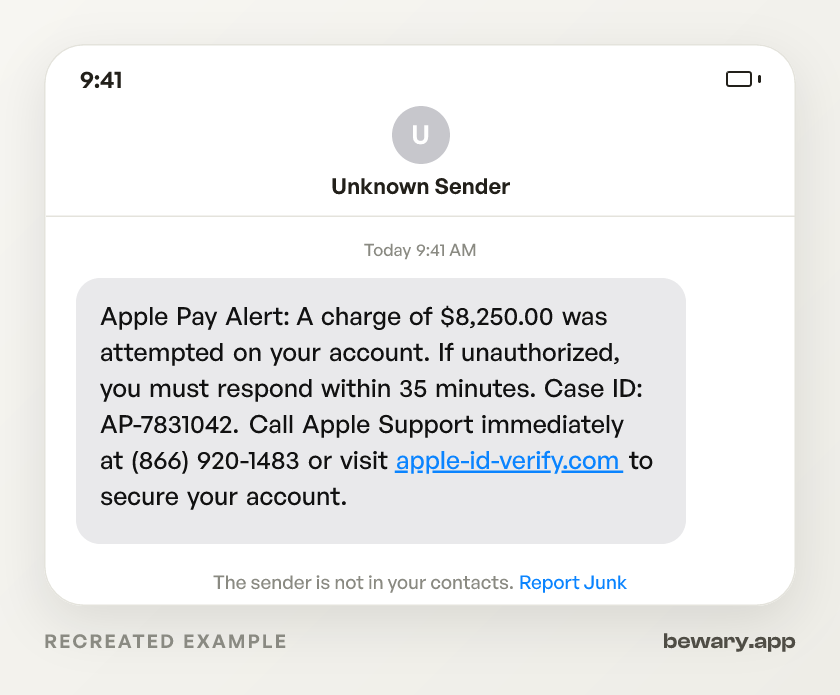
Apple Pay Alert: A charge of $8,250.00 was attempted on your account. If unauthorized, you must respond within 35 minutes. Case ID: AP-7831042. Call Apple Support immediately at (866) 920-1483 or visit apple-id-verify.com to secure your account.
Scam. Apple Card and Apple Pay fraud alerts are push notifications inside the Wallet app. They do not arrive by SMS. Your Apple ID password, two-factor code, full card number, and Social Security number are never requested by Apple over text, email, or phone. The message you got is a credential harvest: someone wants your Apple ID login and the six-digit verification code that unlocks it.
How to spot the Apple scam
- Apple Card alerts live in the Wallet app.Why
- The phone number connects to a scammer, not Apple.Why
- The 35-minute countdown is invented.Why
- $8,250 is picked to trigger panic without being cartoonish.Why
- "AP-7831042" is a random string dressed up as a case number.Why
- The link points to a domain that is not Apple's. apple-id-verify.com or applepay-secure.com look plausible at a glance.Why
- Your two-factor code is a login key.Why
- Some versions of this scam push AnyDesk or TeamViewer installs after collecting your credentials.Why
What to do now
- Close the message.Why
- Open the Wallet app and tap your Apple Card or Apple Pay Cash card.Why
- Forward the text to reportphishing@apple.com.Why
- Forward the SMS to 7726 (SPAM) to report the sender's number to your carrier for blocking.
- If you already gave your password or read your verification code aloud, go to appleid.apple.com now.Why
- If you shared your card number, open Wallet, tap your Apple Card, tap the three-dot menu, then Message or Call.Why
What it looks like on your phone
Got a message like this? Check yours free
Paste any text, link, or number you are unsure about. Bewary gives you a straight answer in seconds, and the exact reason why.
Private. Never sold, never tied to you.
The detail behind this
The reasoning behind each line above, for when the immediate question is settled.
Why each of those gives it away
Apple Card alerts live in the Wallet app.
Not SMS. Apple and Goldman Sachs deliver fraud notifications as push notifications where you tap to confirm or deny a charge directly. Suspicious charges are frozen automatically, with no outbound text asking you to call anyone.
The phone number connects to a scammer, not Apple.
Apple Support's real number is on apple.com/contact. The number in this text reaches someone who will ask for your Apple ID password and the six-digit verification code from your screen. That code is your login. Hand it over, lose the account.
The 35-minute countdown is invented.
Goldman Sachs freezes suspicious Apple Card charges automatically the moment they are detected. No window to beat. The timer keeps you from pausing, checking your Wallet app, or calling the number printed on your physical card.
$8,250 is picked to trigger panic without being cartoonish.
Scammers rotate the number. Open your Wallet app: you will find no pending charge, no hold, nothing. The amount is fiction designed to bypass your judgment.
"AP-7831042" is a random string dressed up as a case number.
Apple does not assign case IDs through text messages. Real support cases are created when you contact Apple through apple.com/support or the Apple Support app. The ID makes the message feel institutional. It is not.
The link points to a domain that is not Apple's. apple-id-verify.com or applepay-secure.com look plausible at a glance.
Apple's actual sign-in lives at appleid.apple.com. In scam URLs, recognizable words like "apple" and "verify" are packed in front of a separately registered domain. Read from the right: the root, just before .com, is the part you actually connect to. It belongs to the attacker.
Your two-factor code is a login key.
Apple will never ask for it. Not by text, not by phone, not on a webpage they link you to. If someone on a call asks you to read six digits off your screen, they are logging in as you in real time. That is not verification. That is account takeover.
Some versions of this scam push AnyDesk or TeamViewer installs after collecting your credentials.
Apple runs its own remote support through a screen-sharing session inside the Apple Support app. No third-party download needed, ever. Someone you did not contact asking you to install screen-sharing software is taking over your machine.
Working through the steps
Close the message.
Do not call, do not tap. No real fraud alert requires you to act through a text message.
Open the Wallet app and tap your Apple Card or Apple Pay Cash card.
If there is no pending charge or alert, no charge was made. Wallet is the only place Apple Card activity shows up.
Forward the text to reportphishing@apple.com.
That is Apple's published reporting address for phishing attempts.
If you already gave your password or read your verification code aloud, go to appleid.apple.com now.
Change your password. Under Sign-In & Security, review your trusted devices and remove any you did not add. Check for unauthorized Sign in with Apple connections. If a recovery key appeared that you did not create, contact Apple Support through the Support app to regain access.
If you shared your card number, open Wallet, tap your Apple Card, tap the three-dot menu, then Message or Call.
That reaches Goldman Sachs directly. Request a freeze and dispute unauthorized charges.
Sources and reporting
Use official channels to confirm a suspicious request and report fraud.