Is this unpaid toll text from E-ZPass, SunPass, FasTrak, or TxTag a scam?
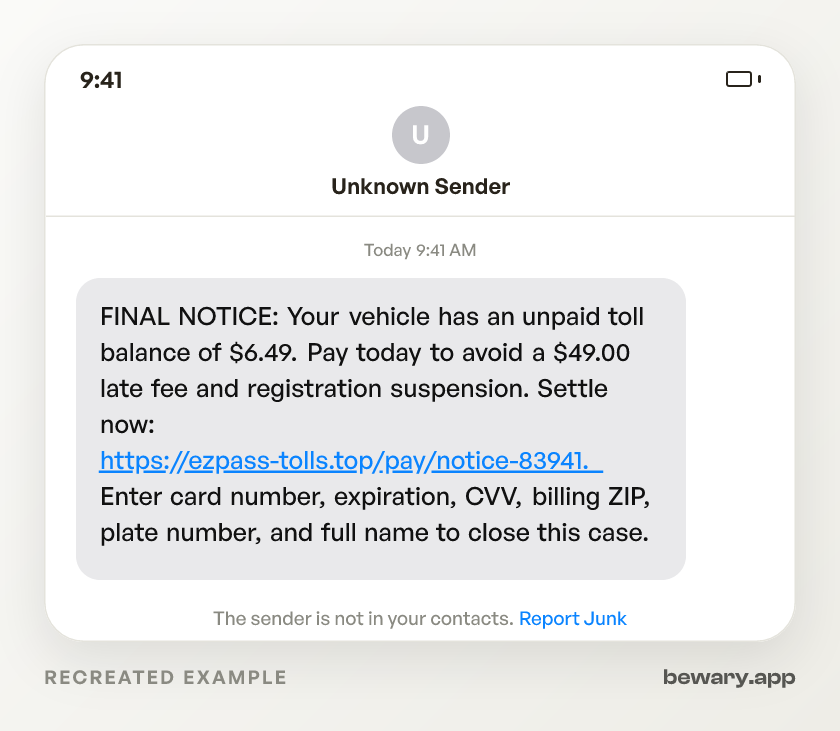
FINAL NOTICE: Your vehicle has an unpaid toll balance of $6.49. Pay today to avoid a $49.00 late fee and registration suspension. Settle now: https://ezpass-tolls.top/pay/notice-83941. Enter card number, expiration, CVV, billing ZIP, plate number, and full name to close this case.
Fake. The payment path gives it away. A real unpaid toll is handled inside the toll agency account, app, invoice, or violation process you already use. This text controls the whole route, from threat to payment page, so you never get to verify the charge before handing over card data.
How to spot the Government toll agencies scam
- Treat a toll text with its own payment link as fake.Why
- Stop when a tiny toll turns into a same-day penalty.Why
- Ignore registration-suspension threats sent only by SMS.Why
- Read the root domain at the end of the link before you tap.Why
- Close any toll page that asks for full card data from an SMS.Why
- Do not trust the sender because the area code looks local.Why
- Check whether the text knows your actual toll account details.Why
- Treat mixed brand names as proof the sender is guessing.Why
- Reject any toll notice that exists only inside the text thread.Why
What to do now
- Check the charge inside your toll account before touching the SMS link.Why
- Search for the exact plate, transponder, invoice, or violation in your account.Why
- Pay only from the account or billing route you opened yourself.Why
- If you entered card data, call the issuer using the number on your card.Why
- If you entered a plate or name, expect follow-up toll or DMV threats.Why
- Report the text at ReportFraud.ftc.gov.Why
- Send the message to your toll agency from inside your signed-in account or app.Why
What it looks like on your phone
Got a message like this? Check yours free
Paste any text, link, or number you are unsure about. Bewary gives you a straight answer in seconds, and the exact reason why.
Private. Never sold, never tied to you.
The detail behind this
The reasoning behind each line above, for when the immediate question is settled.
Why each of those gives it away
Treat a toll text with its own payment link as fake.
The scam works because it removes the normal account step. You do not sign in through your saved toll app, see your transponder, or match the notice to a real invoice before the page asks for a card.
Stop when a tiny toll turns into a same-day penalty.
The $3, $6.49, or $11.83 balance is priced to feel cheaper than thinking. The page is not trying to collect a toll. It is built to collect the card number, expiration date, CVV, billing ZIP, plate, and name in one pass.
Ignore registration-suspension threats sent only by SMS.
A text message cannot suspend a registration because you did not tap its link by midnight. That threat is there to make a $6.49 fake toll feel like a DMV problem, then push you into the scammer's card form before you check your account.
Read the root domain at the end of the link before you tap.
In ezpass-tolls.top, sunpass-update.net, or pay-fastrak.co, the brand word is decoration and the real domain is the last registered chunk. Scammers put E-ZPass, SunPass, FasTrak, or TxTag on the left because phone screens cut links short and hurried people read from the front.
Close any toll page that asks for full card data from an SMS.
The fake form copies the rhythm of a checkout page, then asks for card number, expiration, CVV, billing address, ZIP, full name, and often a plate number. That mix lets the scammer try card-not-present charges that look tied to a real billing address, not just a stolen number.
Do not trust the sender because the area code looks local.
Toll smishing often comes from a rented number, a spoofed number, or an iMessage address that has no connection to the agency named in the text. The stronger evidence is the combination of a surprise balance, a same-day threat, and a link that does not take you through your existing toll account.
Check whether the text knows your actual toll account details.
Many fake notices say only “your vehicle” or “unpaid toll” because the sender has no transponder, invoice, route, plaza, or date. If a plate appears, still check it inside your account. Plates can be scraped, leaked, mistyped, or guessed from other records.
Treat mixed brand names as proof the sender is guessing.
Some waves mention E-ZPass in one line, then use a generic toll-services logo or a different state program on the payment page. Real billing systems do not need to impersonate several agencies at once. Scammers reuse one kit and swap the logo to match whatever state they are targeting.
Reject any toll notice that exists only inside the text thread.
A real toll debt leaves a trail you can find without using the message, such as an account entry, invoice, violation notice, or agency billing record. If the only place the dollar amount, deadline, and payment button exist is the SMS, the sender controls all the evidence.
Working through the steps
Check the charge inside your toll account before touching the SMS link.
Open the app, saved bookmark, paper statement, or account path you already used before this text arrived. This breaks the scam’s control over the payment route and shows whether the toll exists outside the message.
Search for the exact plate, transponder, invoice, or violation in your account.
Look for the date, toll road, plaza, amount, and notice number. If the account has no matching record, do not pay the SMS balance just because the text says “final notice.”
Pay only from the account or billing route you opened yourself.
Do not copy the text link into a browser and do not use a search result ad that appears after you panic-search the brand name. This keeps your card out of the cloned toll portal and puts any real payment into the agency’s normal billing flow.
If you entered card data, call the issuer using the number on your card.
Say you entered the card, CVV, billing ZIP, and name into a fake toll-payment page. Ask for a replacement card, block new charges on the old one, and dispute any charge you did not make, especially small test charges after the text.
If you entered a plate or name, expect follow-up toll or DMV threats.
Save the SMS, the payment screen, the domain, and any confirmation message because those details show the script used against you. Watch for a second message claiming a larger fine, registration hold, collections fee, or court notice tied to the same plate.
Report the text at ReportFraud.ftc.gov.
Include the sender number, the exact dollar amount, the claimed agency, and the link shown in the message. The report creates a record of the government-imposter toll text and gives investigators the domain and wording used in the attack.
Send the message to your toll agency from inside your signed-in account or app.
Use the contact option after you open the account yourself, not any phone number or link from the text. This lets the agency see the fake wording and domain while you keep the conversation tied to your real account.
Sources and reporting
Use official channels to confirm a suspicious request and report fraud.