Is the text saying reply Y to reopen the link a scam?
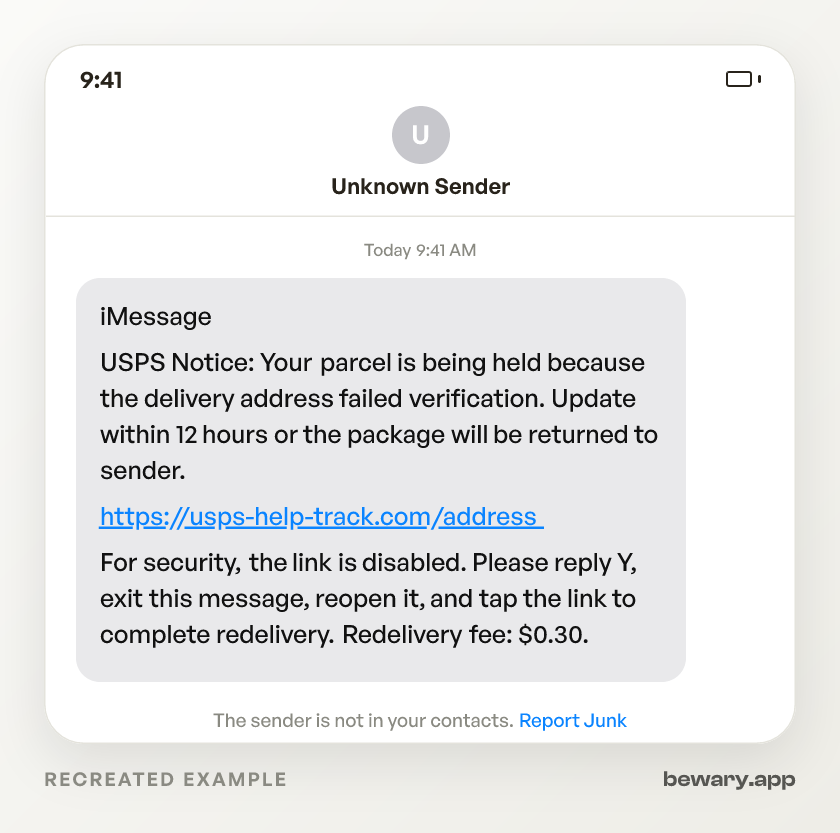
iMessage USPS Notice: Your parcel is being held because the delivery address failed verification. Update within 12 hours or the package will be returned to sender. https://usps-help-track.com/address For security, the link is disabled. Please reply Y, exit this message, reopen it, and tap the link to complete redelivery. Redelivery fee: $0.30.
It is a scam. The structural tell is the disabled link plus the demand that you reply before the link works. On iMessage, links from unknown senders can sit disabled until you answer, and the scam turns that safety behavior into an instruction. The sender wants you to switch the link on yourself, then land on a fake payment or login page.
How to spot this scam
- Do not reply Y to make the link work.Why
- Treat “reopen the message” as the bypass.Why
- Do not trust a safety warning written by the sender.Why
- Read the root domain only after you refuse the reply step.Why
- Do not let a tiny fee lower your guard.Why
- Reject a deadline that only the link can solve.Why
- Demand identifiers the text does not give you.Why
- Treat your reply as part of the scammer’s tracking.Why
What to do now
- Leave the message unanswered.Why
- If you already replied, do not reopen the thread.Why
- Use the tracking number, plate notice, or order record you already had.Why
- Report the thread before you delete it.Why
- Close the page if you tapped but typed nothing.Why
- Call your card issuer if you typed card details.Why
- Reset the copied account if you typed a password or code.Why
What it looks like on your phone
Got a message like this? Check yours free
Paste any text, link, or number you are unsure about. Bewary gives you a straight answer in seconds, and the exact reason why.
Private. Never sold, never tied to you.
The detail behind this
The reasoning behind each line above, for when the immediate question is settled.
Why each of those gives it away
Do not reply Y to make the link work.
That is the mechanism, not a harmless confirmation. The scammer knows the link may arrive dead in iMessage, so the message tells you to answer first, then come back after the phone has treated the sender as someone you engaged with.
Treat “reopen the message” as the bypass.
Real customer service does not need you to refresh an iMessage thread before a bill, toll, or delivery page appears. That odd sequence is there because the scam needs the app to redraw the URL as a live tap target.
Do not trust a safety warning written by the sender.
The line may say “For security, Apple has disabled this link,” but it sits inside the scam text, not in a separate Apple system prompt. The sender is borrowing Apple’s safety language while asking you to undo the safety feature.
Read the root domain only after you refuse the reply step.
In https://usps-help-track.com/address, the root domain is usps-help-track.com, not USPS. In https://tollpay-ezpass.com/invoice, the root domain is tollpay-ezpass.com, not your toll agency. The brand word at the front is decoration.
Do not let a tiny fee lower your guard.
The $0.30 redelivery charge and the $6.99 toll balance are bait, not the payday. The page wants your full card details, and many versions add a second screen for a bank login or a one-time code after the fake charge “fails.”
Reject a deadline that only the link can solve.
These texts say 12 hours, final notice, or today only, then give you no useful path except the revived URL. That is the pressure loop. The timer is built to make the reply step feel procedural instead of dangerous.
Demand identifiers the text does not give you.
A real shipment, toll, refund, or card alert normally has something you can match against records you already have, such as a tracking number, plate, order, merchant, or last four digits. These lures often use broad nouns like parcel, invoice, refund, or account because the link is where they plan to learn who you are.
Treat your reply as part of the scammer’s tracking.
Even if you never tap, a Y proves the phone number is read by a person and that the person follows instructions. In many smishing flows, the reply is the conversion event before the payment page, because it separates dead numbers from targets worth hitting again.
Working through the steps
Leave the message unanswered.
Do not send Y, YES, STOP, a question mark, or an angry reply. The safest state is the original state, with the URL still dead and the sender still untrusted by the thread.
If you already replied, do not reopen the thread.
The link is now live, which is exactly what the text wanted. Close Messages from the app switcher if you have to, but do not return to test the URL or see whether the preview changed.
Use the tracking number, plate notice, or order record you already had.
If the text claims a package, check the tracking number from the purchase receipt or shipping email you received before this text. If it claims a toll, use the mailed notice, transponder account, or plate record you already use. The point is to verify the claimed event, not to inspect the fresh link.
Report the thread before you delete it.
Tap Delete and Report Junk if Messages offers that option. For carrier reporting, forward the SMS or MMS to 7726, the short code for SPAM, then delete the thread. Reporting feeds the phone and carrier filters that catch the same reply-Y wording for other people.
Close the page if you tapped but typed nothing.
Do not press Continue, Pay, Update Address, or Verify Card to “see what happens.” The first page may only be a handoff page, and the real theft often starts on the second screen after the tiny fake fee.
Call your card issuer if you typed card details.
Treat it as more than a $0.30 or $6.99 charge. Tell the issuer the card was entered on a smishing page that became clickable after you replied to a text, and ask them to replace the card, check pending authorizations, block digital-wallet token enrollment, and review phone, email, and address changes.
Reset the copied account if you typed a password or code.
Start with the service the fake page pretended to be, then remove unknown devices and active sessions. If the code was from a bank, card issuer, email provider, or wallet app, contact that provider because the code may have approved a login, password reset, or wallet add. Use an authenticator app, passkey, or hardware key for 2FA where the real service allows it.
Sources and reporting
Use official channels to confirm a suspicious request and report fraud.